Homework 2
Due Date: Friday, January 23, 2026 @ 11:59PM
Note There is no new GitHub classroom assignment for this homework. Please use the same repository as we have been using for previous homeworks.
Please do your work for Homework 2 in a new branch that you create (do not use the feedback branch or other existing branches).
Part 1: Show Matching Parentheses Highlight
Motivation
To use the Show Surrounding Parens feature, the user clicks on one line of code surrounded by parentheses, and then uses the Edit -> Show Surrounding Parens option to highlight the code that is surrounded by parentheses. We found through our market research (TM) that the highlight can be a little fast, and want to give users more time to react to the highlight.
Required Features
- Modify the length of time matching parenthesis are highlighted so that the amount of time that the code is highlighted is 5 seconds long. This mainly shows up in the
Edit -> Show Surrounding Parensfeature, but it also shows up elsewhere. - Create a UML diagram for the Show Surrounding Parens feature to describe the relationship of the classes and functions used in the feature to other parts of the codebase.
- You will also need to do this for future homeworks in your process journal!
Part 2: Format Paragraph Custom Width
Motivation
In different codebases, the convention for the maximum width of text before it is wrapped can be different. For instance, PEP-8 mentions:
Limit all lines to a maximum of 79 characters… [but] Some teams strongly prefer a longer line length. For code maintained exclusively or primarily by a team that can reach agreement on this issue, it is okay to increase the line length limit up to 99 characters, provided that comments and docstrings are still wrapped at 72 characters.
There is a handy feature in the IDLE editor called Format Paragraph that will help users wrap text when the line length limit is exceeded. You can find it under Format -> Format Paragraph.
However, the threshold for the number of characters that it will allow per line is fixed.
To enable more flexibility for teams to set the maximum width of text before it is wrapped, we want to query the user for the maximum width of text after the Format Paragraph feature is selected but before the text is wrapped.

Required Features
- When the user selects
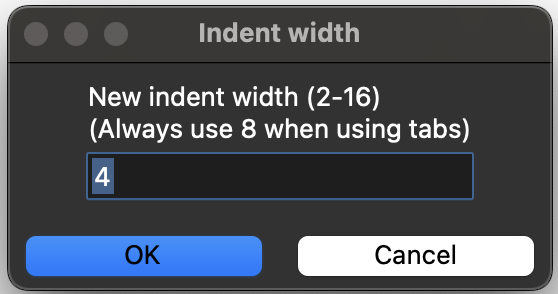
Format -> Format Paragraph, prompt them for an integer to set the text wrap width before wrapping happens. This prompt must match the style of theFormat -> New Indent Widthfeature. You should NOT create a new class or build a custom UI widget from scratch (e.g., using Toplevel); instead, use the codebase’s existing tools for querying user input.- There should be error messaging for if the user enters a non-numeric value, an integer that is too small (less than 20), an integer that is too large (greater than 100), or a negative number
- If the user enters a valid number, the UI widget should close and the paragraph should be formatted with the entered width
- Set the default value for the input to be based on what is currently stored in the configuration file for default max width of text before it is wrapped
- Play a tkinter bell if nothing is changed or no paragraphs are formatted
- Create a UML class diagram describing the relationship among the classes and functions used in the modified
Format Paragraphfeature to other parts of the codebase.
Example query UI widget from Format -> New Indent Width
Optional Features
Completing the following optional features will have no impact on your final homework grade, but we encourage you to try them out!
- (OPTIONAL) After formatting, show a status message stating how many lines the newly formatted paragraph(s) spanned
Submission
Please do your work for Homework 2 in a new branch that you create (e.g., homework-2). Create this branch off of main, not off of homework-1. Do not use the feedback branch or other existing branches.
Documentation (Process Journal):
Please create a folder called Homework2 inside the idlelib codebase. Within this folder, you will add your Process Journal. The instructions for your Process Journal can be found here.
Note: For this process journal, you will also need to include Design Decisions (e.g., different implementation approaches you considered, trade-offs between those approaches, and justifications for your choices) and UML class diagrams.
Pull Request
Make a pull request for the final submission, but do not merge it. For the pull request, please follow the template provided here.
Video Submission
Note: We are adding a video submission for Homework 2. Please read the description below for how to submit this video.
In addition to the Pull Request, please make a video that is no longer than 2 minutes (it can certainly be shorter). The video should:
- Show the increased highlight duration for the Show Surrounding Parens feature.
- Show the user prompt for the Format Paragraph feature formatting different line lengths, and handling input edge cases.
- Any other edge cases that would help justify the correctness of your implementation.
The video is best done on a private Zoom room, where you share your screen and record the meeting. Then, you can download the video and upload it (to either Google Drive or Youtube), and include the link to the video in your pull request description. Please make sure to have the correct permissions on your video so that the course staff will be able to view it.
Grading
Grading checklist: here