Homework 6
Due: Tuesday March 3rd, 2026 11:59 PM (Week 9)
Part 0: Google Form
Complete the google form sent in the email to you. If you did not, or did not find this page through a google form, email asmithwick@ucsd.edu.
Part 1: Highlight Current Line Number
Motivation
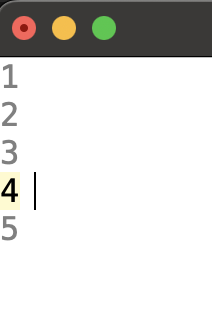
In VS Code, the line number that your cursor is on is highlighted in a different color than the rest of the line numbers. This is a helpful feature that allows users to quickly identify the line number that their cursor is on.
Required Features
- Highlight the line number that your cursor is on in a different (readable) color than the rest of the line numbers
- Avoid using global variables / hardcoded values in the same file to store the color of the line number that your cursor is on. The color should be configurable by the user, and should have a default value that can be overridden.
- Note that you do NOT need to implement this as its own file.
Submission
Both Part 1 and Part 2 should be submitted in a single pull request.
Part 2 Navigation Stack (Go Back / Go Forward)
Motivation
Modern editors let developers jump around code and then easily return to where they were. IDLE currently offers search and “Go to line”, but does not provide an editor-style navigation history.
Your task is to implement a Navigation Stack in the IDLE editor window with Go Back and Go Forward actions.
Task
Add a navigation history to the Python Editor Window (not the Shell).
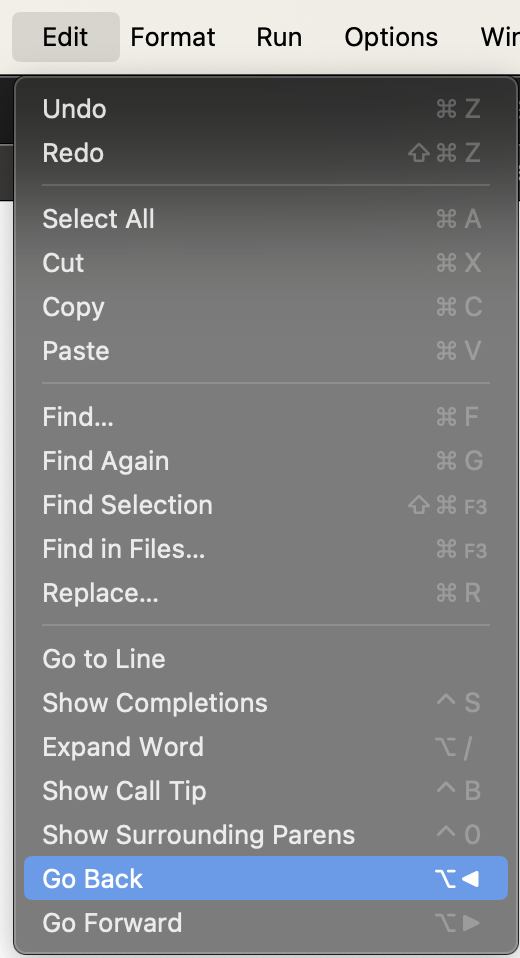
This feature is similar to the VS Code navigation history feature (the arrows in the upper left)

Required Features
- You should add two new menu items to the editor:
Go BackandGo Forward. These should only be visible/active in the Editor Window. - Intentional cursor movements should create new history entries, which
Go Backwalks backward through andGo Forwardwalks forward through. However, minor movements (filtered by debouncing and distance thresholds, see below) should not create entries. - Similar to
undo/redo, if you go back and then move somewhere new, the forward history is cleared. -
When developing the Go Back / Go Forward feature, it is important to be intentional on what movements get added to the navigation stack. Your solution must avoid creating a new history entry for every tiny cursor movement. For this assignment, you should use debouncing and cursor distance thresholds to avoid creating new history entries for every tiny cursor movement. A description of each is below:
Debouncing: A technique that delays recording cursor movements until a short period of inactivity has passed (e.g., 500ms). This prevents rapid, successive movements from creating multiple history entries, ensuring only intentional pauses in navigation are recorded.
Cursor distance thresholds: A method that only adds a new history entry if the cursor has moved a significant distance from the last recorded position (e.g., at least 5 lines or 10 characters). This filters out minor adjustments, focusing the history on meaningful jumps in the code. You can pick out the exact values on your own, but be prepared to justify them.
- Prevent “self-recording” loops: cursor jumps from the
Go BackandGo Forwardcommands themselves must not create new history entries. For example, when a user clicks theGo Backbutton, the resulting cursor jump should not create a newGo Forwardentry. All other cursor movements (including user actions like arrow keys, mouse clicks, typing, and operations like Find or Go to Definition) should create history entries if they pass the distance and debounce filters.
Optional Features
- If there is no valid Back/Forward destination, ring the Tk bell.
- Bind both the Go Back and Go Forward commands to keyboard shortcuts of your choice.
Submission
Please submit this by 11:59PM on Tuesday, March 3rd, 2026. Use the pull request template and make sure to include screenshots of your new feature in action.
Important: You will NOT submit the usual process journal or a UML diagram for Homework 6.
Instead of using this repository, you will document your work by exporting your logs to a separate folder named homework-6. Please submit the following:
- GitHub Copilot Chat Logs: Export your full conversation history from the session. To do this, open the Command Palette (typically Ctrl+Shift+P or Cmd+Shift+P) and type: “Export Chat” This will export your Copilot chat history, which includes all interactions you’ve had with GitHub Copilot during your work on this homework. Save the resulting file as
copilot_chat.txtin thehomework-6folder.

- VS Code Extension Logs (
process.txt):- Open the Command Palette (typically Ctrl+Shift+P or Cmd+Shift+P).
- Type and select: Export Process Data. This will export the logs from the ProcessTracker extension. It will create a file called
process.txtin the directory that you have open in yourVSCode. The file includes some of your interactions with VSCode during the project. This file will be considered as your process journal for this homework, so make sure to keep the extension enabled while you work on HW6 and to export the process data before making your pull request.

- Move the resulting file (which should be called
process.txt) in thehomework-6folder.
Homework Assessment
You should have gotten an email confirming whether you will do an oral exam for this homework or an asynchronous video exam (submitting a video explaining your code).